Menu review and approval for hospitality teams

Less back-and-forth. Better menus.

Review menu wording, make changes visible, and keep the approved version moving.

Built around the handoff between chefs, reviewers, and the teams who publish menus.

A spelling error in a published menu PDF
Crop of the actual Marina Kitchen menu showing GUINESS DRAUGHT in the Import beer list.
Crop from the preserved menu capture; this spelling was also checked in the PDF linked by Marriott on 2026-09-22.
Menu PDF

GUINESS DRAUGHT

Spelling correction

GUINNESS DRAUGHT

Prospect example only. It does not show a MenuManager detection or represent the restaurant’s printed menu today.

Richard Sandoval Hospitality workflow · recorded use

Menus submitted through MenuManager from 19 properties.

May 14–September 21, 2026
164 submitted menus

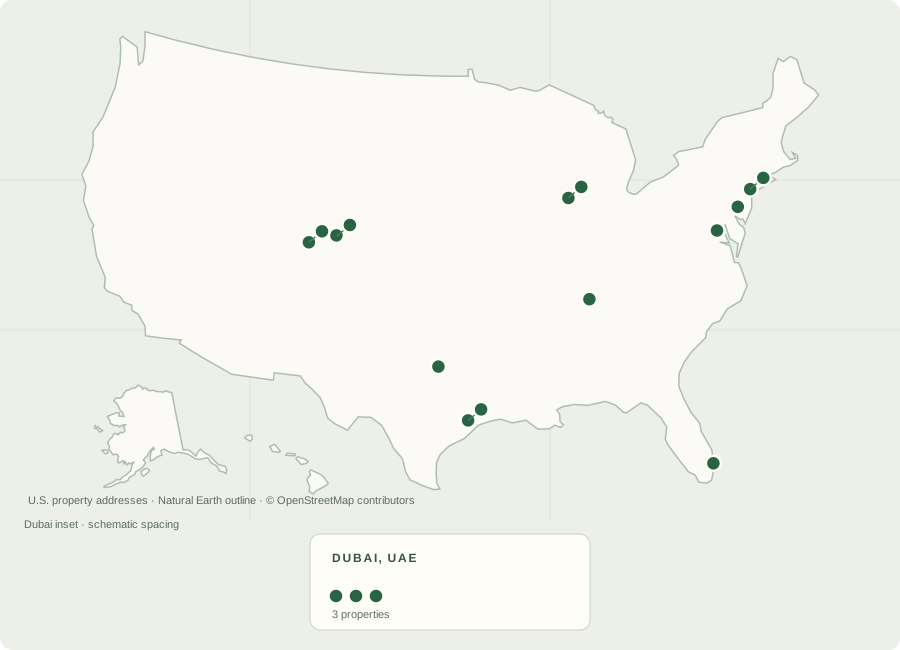
Map showing 16 U.S. properties and 3 properties in Dubai. Every property is listed below.
19 properties representedHistorical MenuManager use through September 21, 2026.
See all 19 properties
How this snapshot was counted

164 non-deleted MenuManager form submissions recorded May 14–September 21, 2026, across 19 property records. This describes historical recorded use, not 19 customers or a review of every menu currently published. The count excludes imported ClickUp history and design-approval events. Houston includes preopening work.

One connected workflow

From menu brief to approved handoff.

The product keeps the source, reviewer decisions, and approved version connected.

01 · Start with the current version

Start with the latest approved menu.

Open the approved menu for your restaurant and build the next update from there. Previous corrections stay in your starting copy, so an old attachment is less likely to send the team through the same work again.

MenuManager checks for an older or mismatched starting version before review or submission.

01 · Current sourceLatest approved menu
02 · UpdateYour changes
03 · ReviewNext approval
02 · Review together

Consider suggestions. A person makes the decision.

Edit the wording, accept a change, or leave it as-is. The reviewer controls the approved copy.

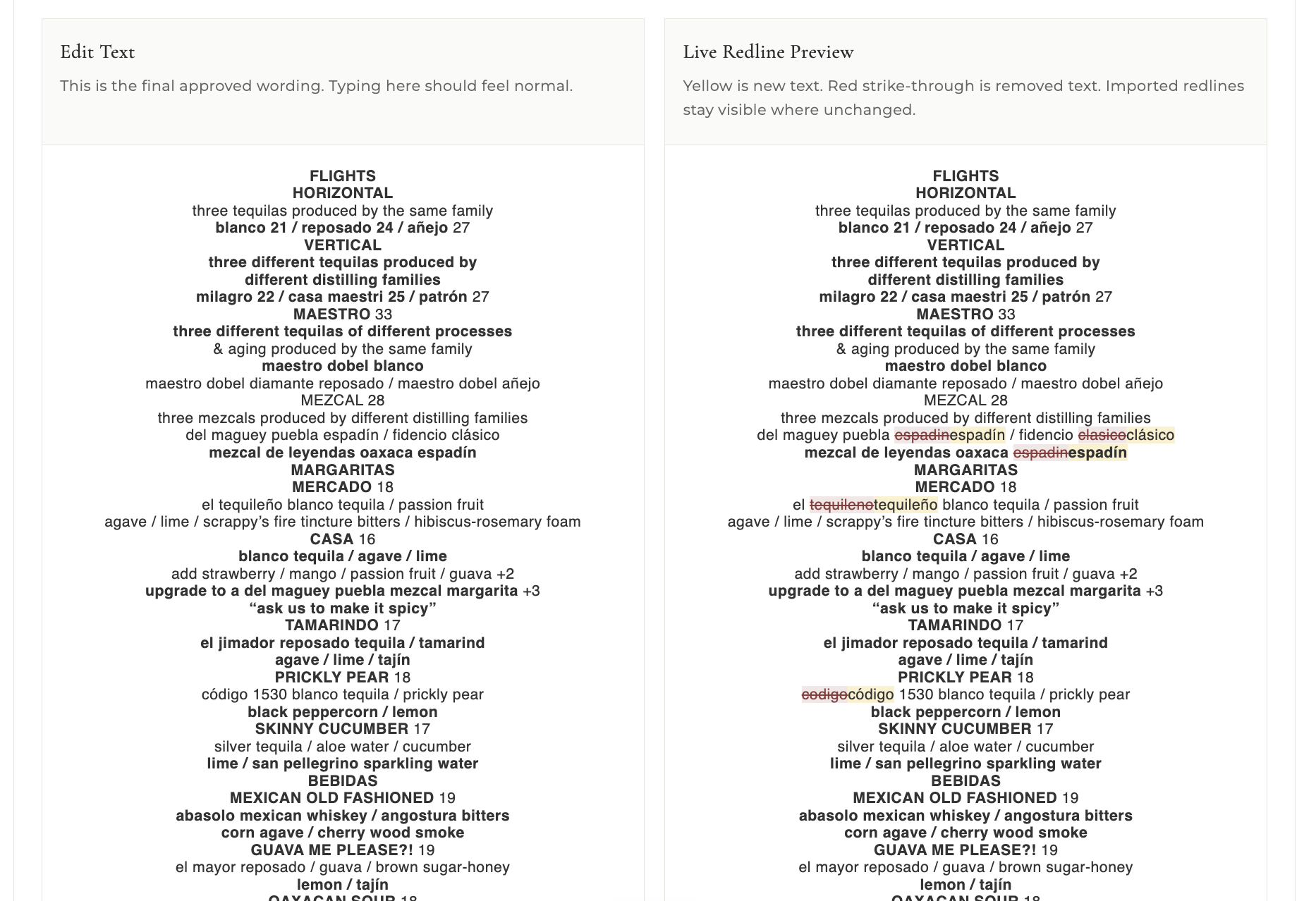
MenuManager editor showing original text beside a live redline preview with proposed edits highlighted
Review and redline view
03 · Approve and hand off

Preserve the approved version and pass it along.

Save the approved version, retain its history, and pass the menu to the next team.

Approved versionConfigured team handoff

Estimated time savings

About 35 staff minutes saved per menu

20 min

Chef administration · estimated

Less time finding files, cleaning old markup, preparing changes and handling documents.

15 min

Corporate review · reported average

The corporate reviewer reports less time on routine corrections and follow-up.

Combines a chef workflow estimate with the corporate reviewer's reported average. Actual savings vary by menu and workflow.

Starting from the approved version also helps avoid redoing edits when an outdated menu resurfaces.

How we estimated the time

Chef administration: A task-by-task comparison estimated 28 minutes in the previous process and 8 minutes with MenuManager, for 20 minutes saved. It covers finding and preparing files, cleaning and applying markup, required project details, document handoffs, and reviewing automated findings. It excludes culinary decisions, writing new menu content, and passive waiting.

Corporate review: The corporate reviewer reported approximately 15 minutes saved per menu on average, including routine review and some avoided follow-up.

The combined 35 minutes is estimated staff effort across two roles. It does not mean approval finishes 35 clock minutes sooner and is not a timed before-and-after study.

Approved-dish library

Make approved menu information useful again.

Search approved dishes and menus by their saved wording, description, and available price or allergen codes. The library gives operations a place to find what was approved and where it came from.

It is a searchable record of approved menu content, not a recipe-costing database.

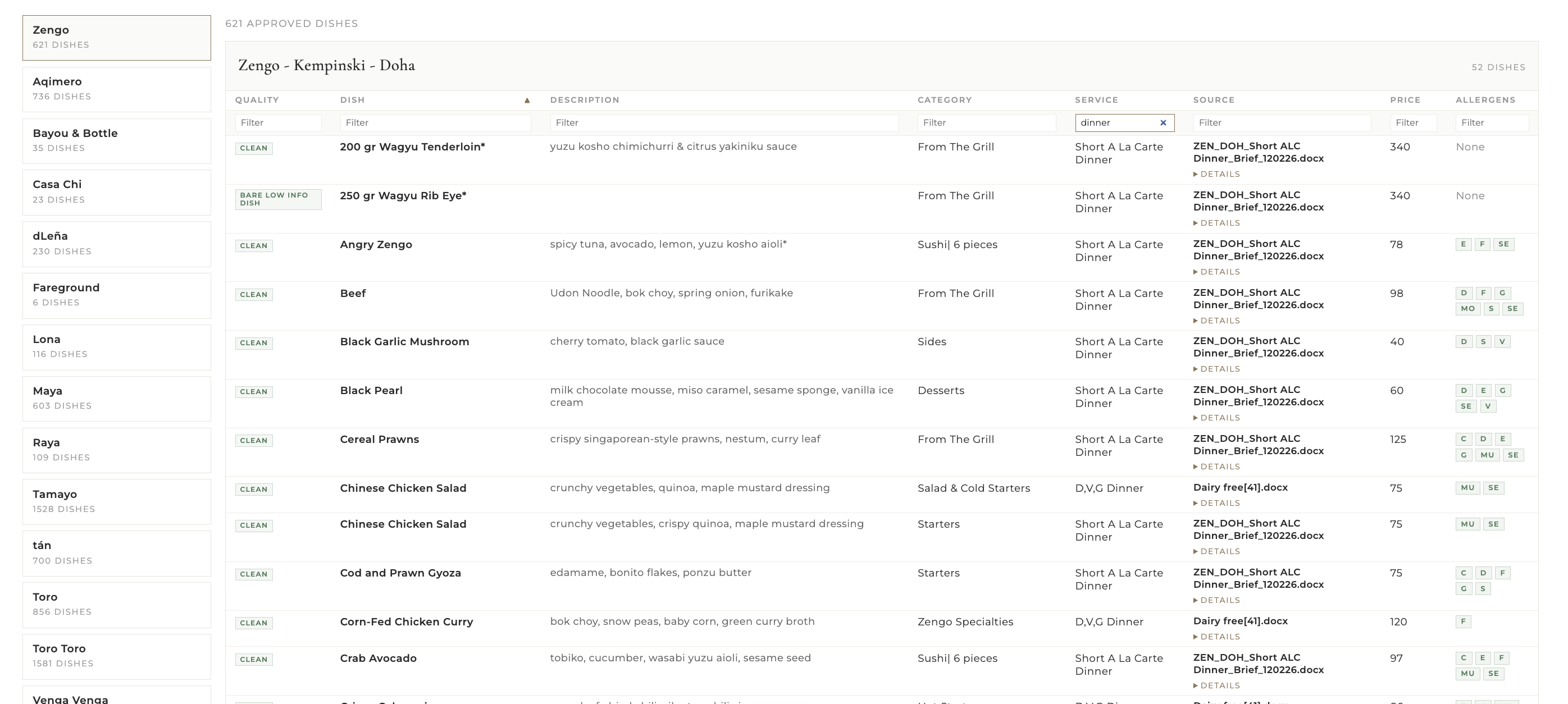
MenuManager approved-dishes table with dish names, descriptions, service, source, price, and allergen-code columns
Approved-dishes view. This interface snapshot includes sample counts and source filenames; those are not current usage metrics.

A workflow that can connect outward

Where does your menu information go next?

Start with the handoff your teams already use, then scope the next destination around your operation.

Approved menu informationReviewed copy and menu filesCurrent product workflow
DesignConfigured SharePoint handoff
WebScope a publishing handoff
POSExplore a customer-specific Oracle MICROS / Simphony connection
RecipesPlan around your recipe system

Configured ClickUp and SharePoint paths are available today. Automatic publishing to POS and other systems would be a scoped future opportunity; it is not a live sync in the product today.

About Derian

Built from the work behind the menu

I’m Derian. I built MenuManager from firsthand hospitality workflow experience; the Richard Sandoval Hospitality team uses it.

I can adapt this workflow and build related tools for hospitality operations, from menu handoffs to the systems around them.

MenuManager is independently developed and owned by Derian. Richard Sandoval Hospitality uses it; it does not own the product.

Start with your workflow

Let’s trace a menu from chef to approval and publication.

We can map the handoffs, then talk through a practical fit for your teams and systems.